
When you create a course, you decide how much the AI shapes the result. One option builds a brand-new course around your material, while the others stay close to a document you already have. Here is what each option does and when to use it.
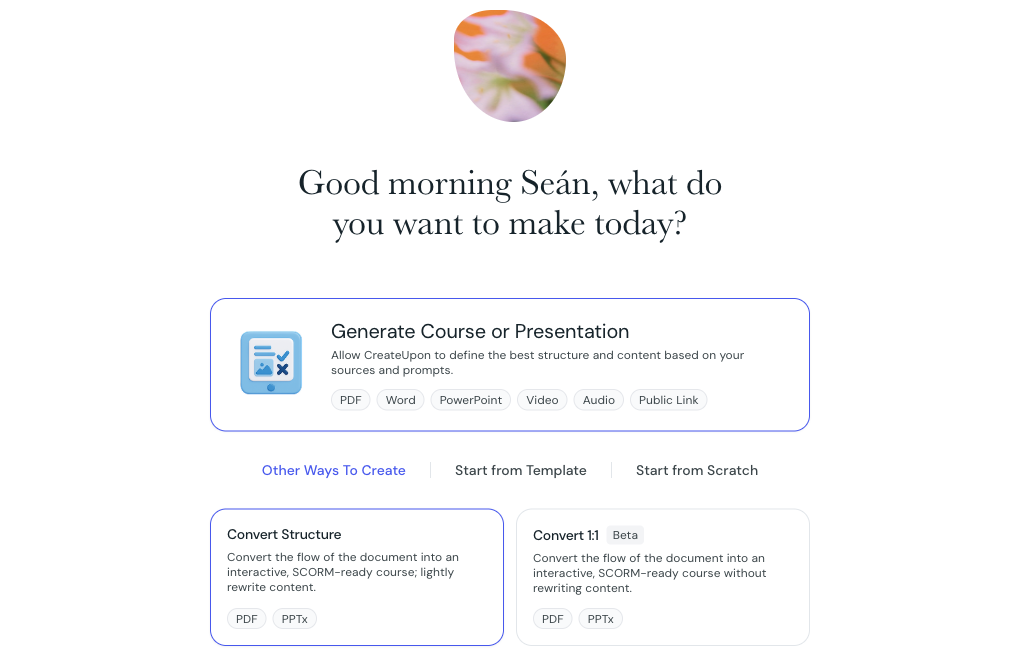
You choose this on the first screen of course creation (the Type step). Generate Course or Presentation is selected by default. To see the other options, select Other Ways To Create.
The AI reads your sources and designs a full course around them: it plans the structure, writes the lessons, and adds elements like quizzes, examples, and key takeaways. Your sources are the source of truth, but the AI expands and reorganizes them into a structured course.
How much the AI changes your content: a lot. It rewrites your material and builds new structure around it.
Best for: turning notes, documents, slides, videos, or audio into a complete course.
Sources: multiple sources (up to 20), and every supported type: PDF, Word, PowerPoint, video, audio, and public links.
Keeps your document's original structure and order, and lightly rewrites the wording to make it clearer and more engaging for learners. The AI follows your document rather than reorganizing it.
How much the AI changes your content: some. It keeps your structure and order, and lightly rewrites the wording.
Best for: when you like how your document is organized but want clearer, more engaging wording.
Sources: a single PDF or PowerPoint file. The result is an interactive, SCORM-ready course.
Reproduces your document as closely as possible, keeping both its structure and its exact wording. Instead of rewriting, it preserves each page's layout and brings the text and images across as they appear.
How much the AI changes your content: very little. Your structure and wording are kept as they are.
Best for: compliance training, policies, or technical material where the exact wording matters.
Sources: a single PDF or PowerPoint file. The result is an interactive, SCORM-ready course.
If you already have a course built in Articulate Rise, you can import it instead of creating one from sources. Upload the Rise SCORM package and CreateUpon converts each lesson into editable cards, then uses AI to add objectives and outcomes. This is different from the conversion modes above, which build a course from documents or other sources.
How much the AI changes your content: your Rise content is preserved as editable cards, and AI adds objectives, outcomes, and a description.
Best for: moving an existing Articulate Rise course into CreateUpon so you can keep editing it.
Sources: a single Articulate Rise SCORM export (.zip), up to 500 MB.
Generate Course or Presentation: build a new course from one or more sources, or from anything that isn't a single PDF or PowerPoint. This suits most people.
Convert Structure: keep a single document's structure but improve the wording.
Convert 1:1: keep a single document almost exactly as written.
Import an Articulate Rise course: bring an existing Rise course into CreateUpon to keep editing it.
Creating a course: the default step-by-step (Generate) flow
A step-by-step walkthrough of the default course creation flow, from adding your sources to reviewing the AI-generated outline, with tips for a strong result at every step.
Creating a course - Import an Articulate Rise course
Upload an Articulate Rise SCORM package and convert it into an editable CreateUpon course, with AI-generated objectives and outcomes.
